

Contents
Submission Procedure
Ridom Typer allows to submit raw read data (FASTQ) together with epidemiological data of a Sample to the European Nucleotide Archive (ENA).
 Important: This function can only be used to submit new ENA entries, and not to update existing once. If a Sample is submitted a second time to the same study, the submission will fail.
As for all public submission in Ridom Typer the Submission Anonymization Filter is shown as first step. In the next step the raw reads are selected for the submission. If the Sample was created from raw reads in pipeline mode, the FASTQs files are associated to the Sample and are automatically filled in and the dialog can be confirmed.
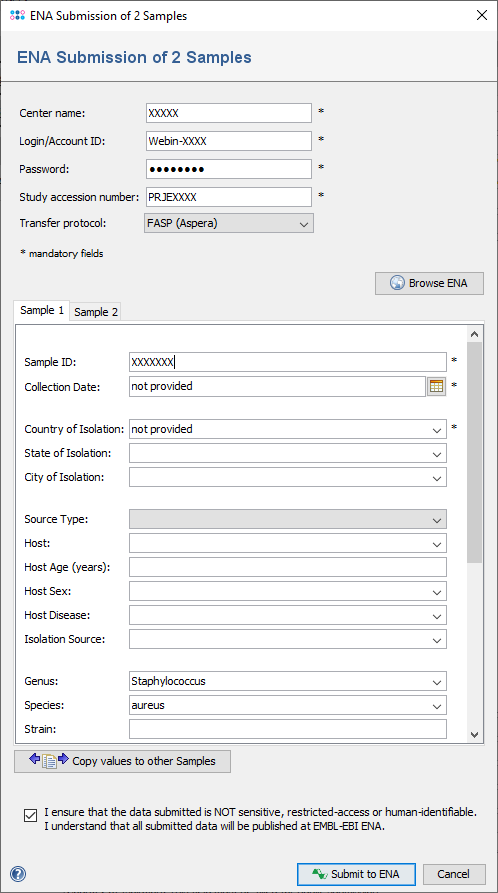
Next the submission dialog window opens, and shows the ENA account specifications and the submission data for each Sample. Mandatory fields are marked by *.
The ENA Account specifications consists of
- Center name
- Login
- Password
- Study accession number
- Transfer protocol
The first 3 values are stored per Ridom Typer user in the database and can be edited with the menu item Options | User Settings. The study accession number must be entered manually for each submission. The study must already be existing. New studies and accounts can be created manually at ENA Webin. The transfer protocol default value is FTP which can be changed to FASP (Aspera) as described below in IBM Aspera section.
Initial editor values are taken from the Sample's data fields and from the Procedure Details, anonymized according to the settings in the Submission Anonymization Filter. The Copy values to other editors button can be used to copy data from the editor in the currently selected tab to all other editors. Make sure the box next to "I ensure that the data submitted is ..." is selected, then click OK to start the submission to ENA.
If the Samples use a Database Scheme that contains the field EBI/NCBI Accession(s), the ENA run accession numbers are appended to this field.
 Hint: A Source Type other than "unknown" must be given if a value for Isolation Source is specified. If Source Type is "clinical/host-associated" a value for Host must be given. Host, Host Age, Host Sex, and Host Disease can only be submitted if Source Type is "clinical/host-associated" and a Host is given. Host Disease is submitted as "host_disease_stage" if it is "healthy". Other values are ignored and not submitted.
Warning: Make sure the entered data is correct because it might be difficult or impossible to remove the data from ENA once a Sample is submitted! In any case removal of data from ENA is not possible with Ridom Typer and requires an interaction with EBI ENA curators.
Genus and Species
Although genus and species are no mandatory fields, they are required to find a Taxon ID from NCBI Taxonomy. Genus and species are concatenated and sent to the NCBI server. The returned Taxon ID is mandatory for ENA submission. If no Taxon ID can be found an error message is generated. If genus and species information is not available, please enter "unknown" in both input fields. This will result in Taxon ID 32644, "unidentified".
Country of Isolation
The country of isolation will be submitted as field geographic location (country and/or sea). A value is mandatory and must be selected from the following values:
Afghanistan
Albania
Algeria
American Samoa
Andorra
Angola
Anguilla
Antarctica
Antigua and Barbuda
Arctic Ocean
Argentina
Armenia
Aruba
Ashmore and Cartier Islands
Atlantic Ocean
Australia
Austria
Azerbaijan
Bahamas
Bahrain
Baker Island
Baltic Sea
Bangladesh
Barbados
Bassas da India
Belarus
Belgium
Belize
Benin
Bermuda
Bhutan
Bolivia
Borneo
Bosnia and Herzegovina
Botswana
Bouvet Island
Brazil
British Virgin Islands
Brunei
Bulgaria
Burkina Faso
Burundi
Cambodia
Cameroon
Canada
Cape Verde
Cayman Islands
Central African Republic
Chad
Chile
China
Christmas Island
Clipperton Island
Cocos Islands
Colombia
Comoros
Cook Islands
Coral Sea Islands
Costa Rica
Cote d'Ivoire
Croatia
Cuba
Curacao
Cyprus
Czechia
Czech Republic
Democratic Republic of the Congo
Denmark
Djibouti
Dominica
Dominican Republic
Timor-Leste
Ecuador
Egypt
El Salvador
Equatorial Guinea
Eritrea
Estonia
Ethiopia
Europa Island
Falkland Islands (Islas Malvinas)
Faroe Islands
Fiji
Finland
France
French Guiana
French Polynesia
French Southern and Antarctic Lands
Gabon
Gambia
Gaza Strip
Georgia
Germany
Ghana
Gibraltar
Glorioso Islands
Greece
Greenland
Grenada
Guadeloupe
Guam
Guatemala
Guernsey
Guinea
Guinea-Bissau
Guyana
Haiti
Heard Island and McDonald Islands
Honduras
Hong Kong
Howland Island
Hungary
Iceland
India
Indian Ocean
Indonesia
Iran
Iraq
Ireland
Isle of Man
Israel
Italy
Jamaica
Jan Mayen
Japan
Jarvis Island
Jersey
Johnston Atoll
Jordan
Juan de Nova Island
Kazakhstan
Kenya
Kerguelen Archipelago
Kingman Reef
Kiribati
Kosovo
Kuwait
Kyrgyzstan
Laos
Latvia
Lebanon
Lesotho
Liberia
Libya
Liechtenstein
Lithuania
Luxembourg
Macau
North Macedonia
Madagascar
Malawi
Malaysia
Maldives
Mali
Malta
Marshall Islands
Martinique
Mauritania
Mauritius
Mayotte
Mediterranean Sea
Mexico
Micronesia, Federated States of
Midway Islands
Moldova
Monaco
Mongolia
Montenegro
Montserrat
Morocco
Mozambique
Myanmar
Namibia
Nauru
Navassa Island
Nepal
Netherlands
New Caledonia
New Zealand
Nicaragua
Niger
Nigeria
Niue
Norfolk Island
North Korea
North Sea
Northern Mariana Islands
Norway
Oman
Pacific Ocean
Pakistan
Palau
Palmyra Atoll
Panama
Papua New Guinea
Paracel Islands
Paraguay
Peru
Philippines
Pitcairn Islands
Poland
Portugal
Puerto Rico
Qatar
Republic of the Congo
Reunion
Romania
Ross Sea
Russia
Rwanda
Saint Helena
Saint Kitts and Nevis
Saint Lucia
Saint Pierre and Miquelon
Saint Vincent and the Grenadines
Samoa
San Marino
Sao Tome and Principe
Saudi Arabia
Senegal
Serbia
Seychelles
Sierra Leone
Singapore
Sint Maarten
Slovakia
Slovenia
Solomon Islands
Somalia
South Africa
South Georgia and the South Sandwich Islands
South Korea
Southern Ocean
Spain
Spratly Islands
Sri Lanka
Sudan
Suriname
Svalbard
Eswatini
Sweden
Switzerland
Syria
Taiwan
Tajikistan
Tanzania
Tasman Sea
Thailand
Togo
Tokelau
Tonga
Trinidad and Tobago
Tromelin Island
Tunisia
Turkey
Turkmenistan
Turks and Caicos Islands
Tuvalu
USA
Uganda
Ukraine
United Arab Emirates
United Kingdom
Uruguay
Uzbekistan
Vanuatu
Venezuela
Viet Nam
Virgin Islands
Wake Island
Wallis and Futuna
West Bank
Western Sahara
Yemen
Zambia
Zimbabwe
missing
missing: control sample
missing: data agreement established pre-2023
missing: endangered species
missing: human-identifiable
missing: lab stock
missing: sample group
missing: synthetic construct
missing: third party data
not applicable
not collected
not provided
restricted access
Line Islands
Saint Barthelemy
Saint Martin
South Sudan
State of Palestine
IBM Aspera
Ridom Typer users can perform alternatively the submission to ENA by using IBM Aspera (FASP) which is faster than standard FTP. In addition, it provides a comprehensive built-in security model and data encryption that does not effect its significant transfer speed. Aspera is using a different port than FTP (default 33001).
Aspera is not deployed with Ridom Typer. For using this feature users have to install a version of the IBM Aspera Desktop Client.
Installing the IBM Aspera Desktop Client
Installation on Windows
The Aspera Desktop Client can be found through IBM Aspera Downloads. By selecting the Windows icon and choosing the latest available version a Download button will appear. By pressing this Download button the user can download the executable file. After the download has finished the user can install the application (Administrator privilege is required).
Through installation steps an Username and a Password must be defined in the IBM Service Account dialog. The username and password are arbitrary and could be used for other Aspera Desktop Client functionalities which are NOT related to Ridom Typer. More information regarding the installation steps can be found in Aspera Client Documentation for Windows. After the installation of Aspera the Ridom Typer client must be restarted for this change to take effect.
Installation on Linux (Ubuntu 18.04)
The Aspera Desktop Client can be found through IBM Aspera Downloads. By selecting Linux Deb and choosing the latest available version a Download button will appear and also an application user guide is presented in different formats. By pressing this Download button the user can download the Debian Software Package file. To proceed with the installation through the terminal the following command can be used:
$ sudo apt-get install /path_to_installer/aspera-desktopclient-version.deb
More information regarding the installation commands for other Linux distributions can be found in Aspera Client Documentation for Linux. After the installation of Aspera the Ridom Typer client must be restarted for this change to take effect.
Enabling Aspera in Ridom Typer
The Transfer protocol can be selected in the last dialog of the ENA submission procedure. By default only FTP is available in this field. If the Aspera Desktop Client was installed, FASP (Aspera) can be chosen in addition here to use the Aspera client for ENA submissions.
FOR RESEARCH USE ONLY. NOT FOR USE IN CLINICAL DIAGNOSTIC PROCEDURES.