

Please Note: Mash Plasmid Typing requires the Long Read Data Analysis Module
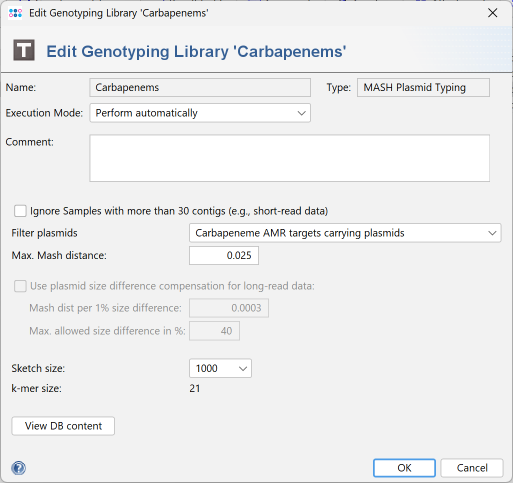
Mash typing settings can be modified in the Genotyping Libraries tab of the Task Template editor.
Plasmids can be filtered for AMR targets. This requires that a Sample also has a "NCBI AMRFinderPlus" Task Entry. Otherwise no typing can be done, except for the "All plasmids" option.
The following filtering options are available:
- Priority AMR targets carrying plasmids
Plasmids that carry priority AMR targets - Non-priority AMR target only carrying plasmids
Plasmids that carry non-priority AMR targets but no priority AMR targets - AMR targets carrying plasmids
Plasmids that carry non-priority AMR targets or priority AMR targets - All plasmids except priority AMR targets carrying ones
Plasmids that carry no AMR targets or non-priority AMR targets - All plasmids. This option does not require a "NCBI AMRFinderPlus" Task Entry.
- Carbapeneme AMR targets carrying plasmids
Plasmids that carry Carbapeneme AMR targets - All plasmids except Carbapeneme AMR targets carrying ones
Plasmids that carry no Carbapeneme AMR targets
Plasmid Typing can be skipped for Samples with more than 30 contigs (e.g., for short-read data).
The max. MASH distance thresholds up to which plasmids are listed can be entered. Default thresholds are:
- with "ignore > 30 contigs": default threshold is 0.001
- without "ignore > 30 contigs": default threshold is 0.025
For long-read data, the distance can be adjusted for plasmids with different sizes. The max allowed size difference and the distance correction per 1% size difference can be entered. If the size difference is greater than the max allowed value, no distance correction is used. Default values are:
- 0.0003 Mash dist per 1% size difference
- Max. allowed size difference of 40%
If a new plasmid Typing is created, the Mash sketch size can be specified. A sketch size of 1000 is the default setting. The k-mer size is fixed at 21 and cannot be changed.
The button View DB content opens a Mash database view window.