

Please Note: Mash Plasmid Typing requires the Long Read Data Analysis Module
Contents
Overview
The MASH Plasmid Typing-Task Template allows to compare plasmids that were identified by MOB-suite in the "Chromosome & Plasmid Overview" using the program Mash [PubMed 27323842]. Similar plasmids in other Samples up to a given max. Mash-distance can be displayed. The plasmids can be filtered by AMR-targets.
Note that plasmid typing is usually only useful for sequence data with complete contigs and plasmids (e.g. long-read data). Using plasmid typing with short read data (e.g. Illumina reads) may result in incomplete or incorrect results.
MASH plasmid typing is deployed with the SeqSphere+ installation, but requires that the SeqSphere+ client is running on Linux or on Windows with installed Windows Subsystem for Linux (WSL).
Requirements
The MASH plasmid typing requires the "Chromosome & Plasmid Overview" Task Template for a Sample to assign contigs to plasmids or chromosome. If AMR targets are to be considered, the "NCBI AMRFinderPlus" Task Template is also required.
 Important:
- If SeqSphere+ is installed on Windows, Mash Plasmid Typing requires the Windows Subsystem for Linux (WSL).
- If SeqSphere+ is installed on Linux, Mash Plasmid Typing must once be installed by calling the installation of Bioinformatic Tools on Linux.
Please Note: Mash Plasmid Typing requires the Long Read Data Analysis Module
Function
Database
The plasmid typing uses the external program Mash to create and search sketch-databases for plasmids. In this manual, these sketch-databases are also called Mash-databases. The Mash-databases are managed by typings for a Task Template. Each typing uses one Mash-database. The databases are stored as attachments to the task template for which the plasmid typing is defined. The plasmid databases and settings can be edited in the plasmid typing editor. The database content and early warnings for the plasmid typing can be edited in the Mash Plasmid Databases management window.
Plasmid search
The Mash plasmid typing uses the "Chromosome & Plasmid Overview" Task Entry of a sample to identify the plasmids and get the contigs for each plasmid. These plasmids can be filtered by AMR targets, depending on the settings in the typing. To make use of this function, a "NCBI AMRFinderPlus" Task Entry must be present for the Sample. The contigs for each plasmid are used to query a Mash-database (using settings k-mer size=21 and a selectable sketch-size) using the program Mash. The next hits in the database up to the defined max. threshold are reported for each plasmid.
The sequence of a query-plasmid is added to the Mash database if is not yet in the database. If the sample data has changed, the old sequence is removed from the Mash-database and the new plasmid-sequence is added. Note that plasmids are not automatically removed from a plasmid database if a sample or a task entry containing the plasimd is deleted from the SeqSphere server database.
Editing
New Mash databases can be created if a new Task Template with a plasmid typing is created or if a plasmid Typing is added to an existing Task Template.
Mash typing settings can be modified in the Genotyping Libraries tab of the Task Template editor.
Mash database contents and Early Warning Alerts (EWA) can be displayed using the command Options > Mash Plasmid Databases.
Access Rights
To edit Mash databases using the Mash Plasmid Databases command users must be able to modify the Task Template that contains the Mash database. To run the Mash Typing, users must be able to view the Task Template that contains the Mash database.
Typing Result View
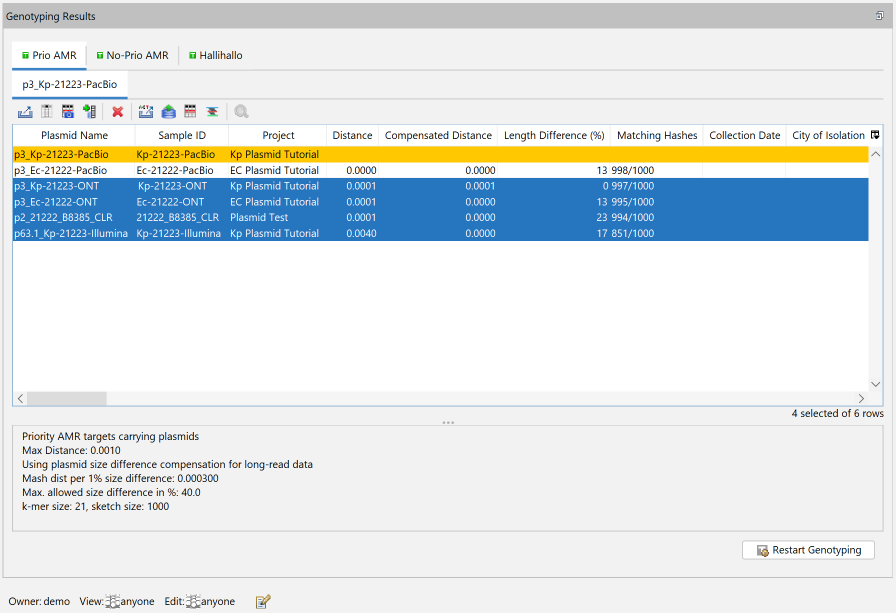
When the Mash Plasmid Typing is processed, the information if a contig belongs to a plasmid is taken from the "Chromosome & Plasmid Overview" Task Template of the Sample.
The external program Mash is then started with the sequences for each plasmid and the Mash-database for the typing. If AMR filters apply for Mash typing, only the source plasmids that contain the selected AMR criteria are used. The plasmid sequences are fetched from the sample attachment. Length compensation is applied to the hits, and hits with a distance above the distance threshold are discarded. The remaining plasmids are then sorted by source plasmids and displayed in a table.
The result view contains a tab with a table for each plasmid. Each table contains the source plasmid, highlighted with an orange background. The table is ordered by
- hits has same genus as query sample (if column "Genus" is available)
- hit has same species as query sample (if column "Species" is available)
- cgMLST distance to query sample (if column "cgMLST Distance" is available)
- Genus Name (if column "Genus" is available)
- Species Name (if column "Species" is available)
- MLST Sequence Type (ST) (if available)
The table contains the following columns:
- Plasmid Name: Taken from the Chromosome & Plasmid Overview.
- Sample ID
- Project: Project for the Sample
- Distance: distance calculated by Mash withouth length compensation.
- Length difference (%): Difference of the length of the source and target plasmid in %
- Matching hashes: Number of matching hashes as calculated by Mash.
- Sample columns with Sample's Collection Date, City of Isolation, ZIP of Isolation, Genus and Species
- Further Sample data with the default Comparison Table fields for the source Sample's Project.
- Table columns from the Chromosome & Plasmid Overview
Error messages will be displayed if not all requirements are met:
- If the Chromosome & Plasmid Overview Task Entry does not contain plasmids, the error message No plasmids found. will be displayed.
- The error message Cannot find result of MOB Suite! is displayed if the Sample does not contain a Chromosome & Plasmid Overview Task Entry.
- If plasmids are to be filtered by AMR results, the Sample must contain an AMRFinderPlus Task Entry, otherwise the error message No plasmids for mode 'Priority AMR targets carrying plasmids' found! will be displayed.
- Task Template X is not writeable! is displayed when the user has not the rights to edit the Task Template for the Typing. The Task Template must be editable because the the Mash-database is stored as an attachment in the Task Template.
A description of the available commands for the table can be found in the section Plasmid Table.
Result Fields
One result field is available for each plasmid typing: Next Hits. The result fields contain the plasmid name for the hit with the lowest length-compensated distance to the current source plasmid. If multiple plasmids have the same lowest distance, the plasmid names are compared alphabetically and the plasmid name with the first name is used. For each source plasmid, the result field contains the text source plasmid name: target plasmid name (dist: compensated distance). For multiple source plasmids "|" is used as separator.
Early Warning
New early warnings for plasmid databases can be defined using the command Options > Mash Plasmid Databases. Unlike the Early Warning Alerts for cgMLST the plasmid Early Warning Alerts are defined for a Typing, and not for a Project.
Plasmid Transmission Early Warning Alerts are triggered if a Sample that is processed by the pipeline using the plasmid typing has plasmids with a Mash-distance below the distance threshold to another plasmid in the database.
If a Sample contains more than one plasmid, multiple EWAs can be created for this Sample, one for each plasmid.
However, to prevent plasmid alerts for clonal transmissions, no alert is reported for a source plasmid if the Project has a single cgMLST Task Template and the target Sample of a plasmid hit has a cgMLST distance to the Sample processed in the pipeline closer than the cluster threshold of the cgMLST typing.
Note: The client that runs the pipeline requires the Linux tools to trigger a plasmid early warning.
Opening plasmid early warnings
The three most recent and unchecked plasmid EWAs that were triggered are shown on the top of the home screen in the section Unchecked Plasmid Transmission Early Warning Alerts. Clicking one of the EWAs will open a plasmid table with plasmid hits.
Additionally, plasmid EWAs are also listed in the Browse EWA window that can be opened using the command Browse Early Warning Alerts from the Options menu.
Search for similar plasmids
The Chromosome and Plasmids Overview allows to search a plasmid database using the Search Similar Plasmids in Mash Database function.
Plasmid Tables
Plasmid early warning alerts, the results of plasmid similarity search and stored plasmid table snapshots are displayed in a Plasmid Table.